
What Are Data Agents? How AI Is Changing the Way Businesses Explore Their Data
Written by: Patricia Harty, Team Lead, Data & Analytics
Many organizations have already invested in analytics solutions like dashboards and reporting tools. On paper, the data and functionality are there. However, in practice, getting quick, meaningful answers to everyday business questions is often still harder than it should be.
For instance, imagine that someone on your finance team notices a performance dip and wants to know why. The dashboard shows them the number, but not the context behind it. They don’t have the technical skills to query databases and figure out the full story themselves, so an analyst, who’s already juggling multiple requests, gets pulled in to investigate.
This is a common pattern. Dashboards are excellent for tracking known metrics, but on their own, they don’t always support deeper exploration. As organizations grow, data often becomes fragmented across systems, making it even harder to access insights that employees need to do their jobs.
But recent advancements, like updates to Microsoft Fabric data agents, mark a shift in how teams can interact with information and adopt AI for business intelligence. Instead of working within the limitations of traditional dashboards, AI is empowering users to ask questions and get quick answers grounded in their organization’s data.
It’s a shift that’s happening quickly: According to PwC, nearly four out of five senior executives say their organizations are adopting AI agents (not necessarily data agents).
In this article, we’ll break down what data agents are, how they’re different from traditional dashboards, where companies are starting to use them, and what it takes to pilot them effectively.
Agentic AI for Analytics: What Is a Data Agent?
A data agent is an AI-powered system that connects large language models (LLMs) with structured enterprise data. Data agents sit on top of your existing infrastructure—think warehouses, lakehouses, or SQL databases—and allow users to interact with that information through natural language prompts.
You can think of a data agent as a kind of control layer or virtual analyst. It works over a complex, often fragmented data environment, interprets user intent, identifies the most relevant data sources, and returns insights while respecting governance and security policies.
From a user’s perspective, the experience is simple. Rather than learning how to write SQL queries, you can simply ask, “What drove the drop in sales last month?” The data agent interprets that prompt, generates the appropriate query behind the scenes, and returns a response. In effect, the agent is translating your question into structured queries, whether that’s SQL, DAX, or another format, so users don’t need deep technical expertise to explore insights.
A key advantage is that these responses are grounded in real enterprise information. When the underlying data is clean, accurate, and organized, this grounding reduces hallucinations and ensures outputs reflect what’s actually happening in the business.
Microsoft Fabric Data Agents
Platforms like Microsoft Fabric show how this concept is being put to work in modern analytics. Rather than functioning as a separate tool, Fabric data agents operate directly within the Microsoft data environment and rely on an underlying ontology, the relationships, definitions, and business logic that describe how your data fits together, to interpret queries and provide context. That means beyond the data itself, Fabric data agents use predefined relationships, KPIs, and other contextual information to provide richer outputs.
For companies already using Microsoft Power BI or Fabric, this approach can make data agents easier to deploy because they inherit the same security policies, access permissions, and relationships that are already defined in the wider platform.
This also highlights how quickly the space is evolving and how rapidly new capabilities are emerging. While Fabric data agents focus on structured, governed data, they can be integrated into broader agent architectures through tools like Copilot Studio. This allows organizations to combine structured data insights with unstructured sources such as documents or APIs, creating more flexible, multi-agent solutions.
Dashboards Vs. Data Agents
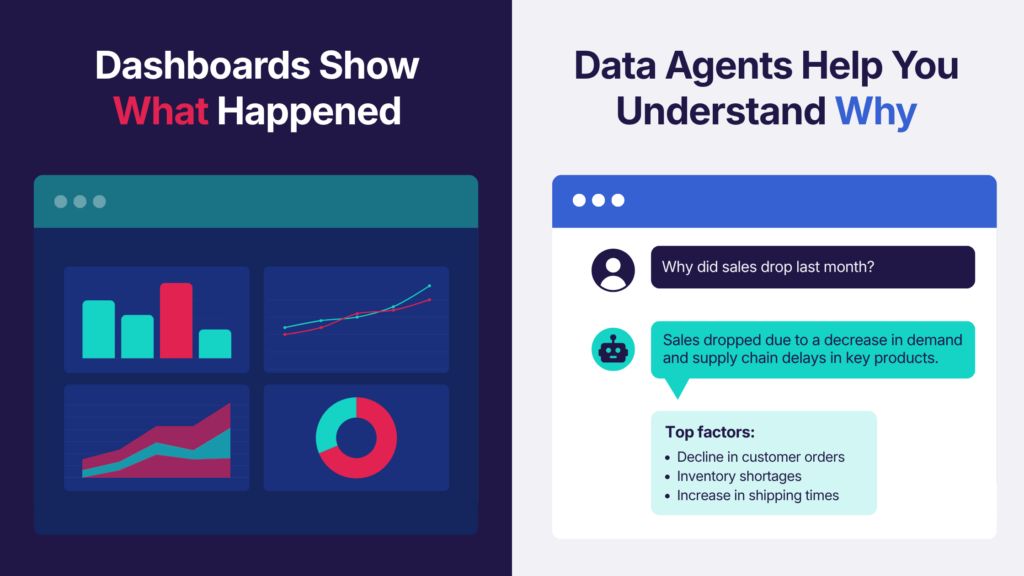
To understand the value of data agents, it helps to look at how they’re different from traditional dashboards. Dashboards are built around predefined metrics and KPIs. Data teams decide in advance which questions matter and create visualizations to track those indicators.
However, real-world situations don’t always follow a set script. When something unexpected happens, like a spike in support tickets, teams often need to dig deeper. This is where data agents really shine, allowing users to explore insights dynamically, in real time.
That flexibility makes it easier to:
- Investigate anomalies or unexpected trends.
- Ask follow-up questions without starting dashboards from scratch.
- Compare performance across regions, products, timeframes, and other variables.
It’s important to remember that data agents don’t replace dashboards, but complement them. Dashboards are still the best way to track KPIs and keep teams aligned. Data agents expand what’s possible by making it easier to explore new questions and interact with data on the fly.
Real-World Data Agent Use Cases
Most organizations are just beginning to experiment with Proofs of Concept (PoCs) to test data agents in controlled spaces. These early use cases focus on providing insights, recommendations, or risk signals rather than taking direct action.
For example, consider a supply chain data agent built on procurement and logistics records. An analyst might ask, “Which vendor should we go with based on lead times and cost?” The agent can evaluate historical performance, compare suppliers, flag high-risk options, and offer recommendations.
Research from Databricks shows that market intelligence, predictive maintenance, and customer support classification are among the most common AI-driven use cases today. Along these lines, data agents could be useful for analyzing equipment data to inform maintenance decisions, or unpacking customer support tickets and call transcripts to understand their pain points.
How to Start Exploring Data Agents
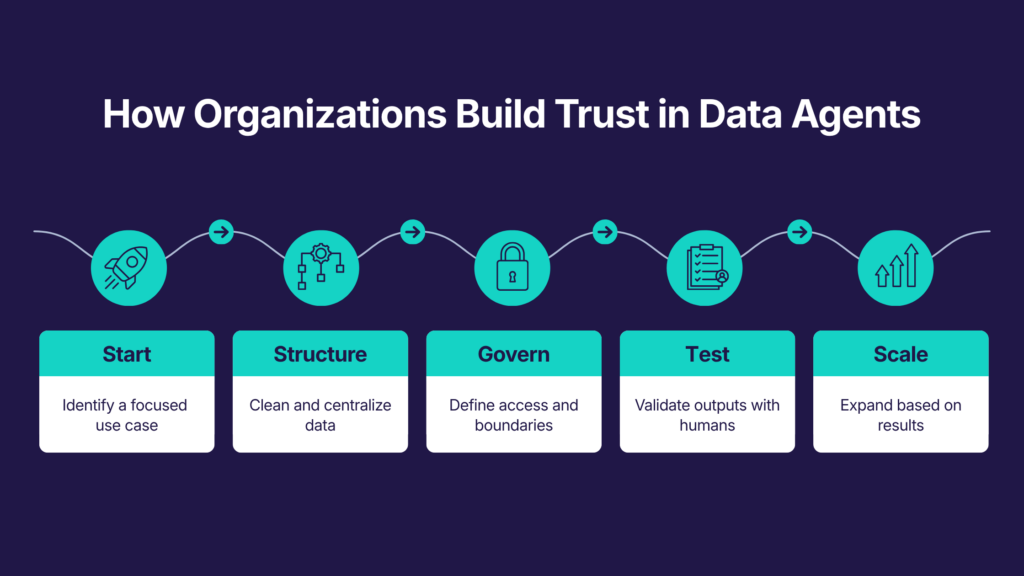
While the potential is significant, data agents are a relatively new technology still being piloted in enterprise workflows. If you’re thinking about experimenting with them, the most effective approach is to start small, build trust, and expand gradually.
1. Start with a solid data foundation
Like any AI system, a data agent is only as reliable as the content behind it—yet only 7% of organizations feel their data is sufficiently cleaned, labelled, and controlled for AI use cases. Siloed, messy, or outdated records will compromise accuracy, fuel poor decision-making, and lead to compliance and security risks.
Before setting up a data agent, make sure to:
- Centralize and structure: Ensure data is organized and accessible through a governed, unified platform like a warehouse or lakehouse.
- Clean and standardize: Remove inconsistencies, duplicates, or outdated records, and come up with a system for formatting and field naming.
- Classify and tag: Use metadata to help data agents interpret information accurately, while clearly labelling sensitive or restricted content they shouldn’t access.
- Build a semantic layer: Define relationships, metrics, and business logic to enable richer outputs that consider context.
2. Establish governance and guardrails
Strong governance and usage policies go hand-in-hand with data management, further supporting output accuracy and compliance. This means clearly stating what the agent can access, the types of questions it’s allowed to answer, and how analysts can use outputs.
Setting those boundaries upfront ensures that the agent generates relevant insights while following both internal policies and regulatory requirements. Consider setting up data agents with instructions to keep the technology tightly scoped for specific use cases.
3. Run a focused PoC
Always start with a specific problem or dataset to pilot rather than rolling out data agents across departments. If you’re not sure where to start, look for areas where teams lack visibility or places where dashboards aren’t giving enough context for everyday questions. Talk to department leaders to find gaps where the technology will have an immediate impact.
Good entry points tend to be:
- Easy to validate against the raw data or existing dashboards.
- Informational rather than decision-critical.
- Low in sensitivity.
Consider running data agent pilots in a sandbox with a small group of users, allowing teams to test accuracy, gather feedback, and iterate safely.
4. Keep humans in the loop
While data agents have the potential to automate tasks, human oversight is still necessary, especially early on. Think of data agents as support tools, not autonomous decision-makers, and ensure analysts validate outputs against trusted sources. Keeping humans in the loop builds confidence and trust in what is still a new capability for most companies.
5. Expand based on what works
Once a PoC proves its value, you can trial other datasets or workflows. A smart approach is to extend the same use case to adjacent teams rather than jumping into complex or wildly different processes. Build on what’s already working by reusing proven prompts, controls, and structures, and introduce new data sources gradually so they’re easy to manage. This kind of incremental rollout helps maintain consistency and monitor for risks like drift and hallucinations.
At this stage, agents should still provide insights and recommendations rather than taking autonomous action. Make sure to track accuracy, usage, and other performance indicators so you can iterate over time. It’s also important to consider employee education and buy-in: train users regularly on best practices, position data agents as support tools (not meant to replace analysts), and scale adoption at a pace that matches user confidence and trust.
A Turning Point in How Organizations Use Data
Data agents are more than just another analytics tool—they mark a big shift in AI for business intelligence and how organizations interact with one of their most valuable assets. Teams can now engage with data dynamically and uncover insights that might have otherwise gone unexplored.
Solutions like Microsoft Fabric data agents are making this capability more secure and accessible in modern data environments. But realizing that value takes more than turning the technology on. It requires a strong data foundation, clear governance, and thoughtful piloting. Organizations that get this right can make better-informed decisions and reduce technical bottlenecks that have slowed analysts down for decades.
At Convverge, we work with organizations to lay that groundwork and adopt emerging technologies like data agents in a structured, low-risk way. If you want to unlock more value from your data, learn more about how we can help.